
How to Withdraw Money from an M999 Game?
Withdrawing money from the M999 is usually a simple process. Open the Withdrawal section, choose an available payment method, enter the amount, provide the required account details, and confirm the request. Before submitting, check that your payment information is correct.
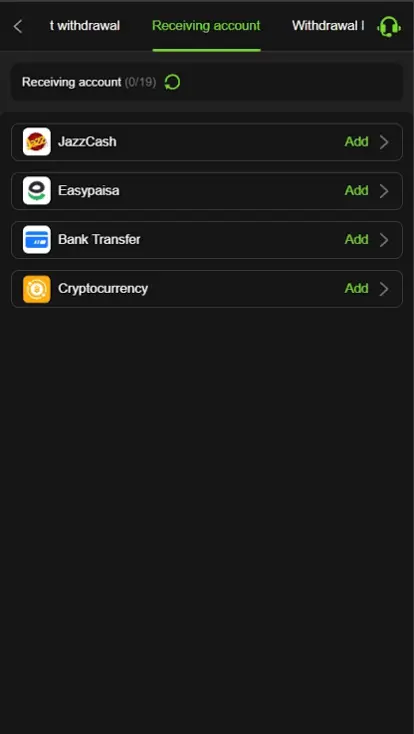
Steps to Withdraw Money from M999
Open the Withdrawal Section
Log in to your game account and select Withdrawal from the account menu.
Select a Payment Method
Choose an available option such as JazzCash, Easypaisa, or Bank Transfer, if supported.
Enter the Withdrawal Amount
Type the amount you want to withdraw and make sure it meets the current withdrawal requirements.
Add Account Details
Enter the correct wallet or bank details linked to your payment method.
Confirm the Request
Review all information carefully and submit your withdrawal request.
Check the Status
Wait for the request to be processed and check your account or payment wallet for the received funds.
Supported Withdrawal Methods in Pakistan
M999 provides several withdrawal options for Pakistani users. According to the platform’s available payment information, users can withdraw funds through Easypaisa, JazzCash, NayaPay, SadaPay, and Bank Transfer (IBFT).
- Easypaisa
- JazzCash
- NayaPay
- SadaPay
- Bank Transfer (IBFT)
Common Withdrawal Issues and How to Easily Fix Them?
- Withdrawal Pending: Wait for the processing period and check the withdrawal status again.
- Wrong Account Details: Recheck your JazzCash, Easypaisa, or bank information before submitting another request.
- Withdrawal Rejected: Make sure your account meets the current withdrawal requirements.
- Balance Not Received: Keep the transaction details and contact official support if the amount does not arrive.
- Payment Method Unavailable: Select another withdrawal option currently shown in your account.
- Technical Issue: Refresh the page, check your internet connection, and try again.
Can I Contact the Support Team During the Refund Process?
Yes. If you face any issue during the refund process, you can contact the game support team for assistance. Provide your transaction details and clearly explain the problem so the support staff can review your request and guide you through the next steps.
After Withdrawal – Managing Your Earnings
After receiving a withdrawal, keep track of your funds and use them responsibly. Save your transaction records, review your remaining balance, and avoid spending more than you can afford. Managing your money carefully can help you stay within a comfortable budget.